Splasm Software Discussions

a user community for the betterment of Splasmkind
It is currently Fri Oct 30, 2026 6:42 am

All times are UTC - 6 hours


Post new topic Reply to topic  [ 4 posts ] 
Author Message
PostPosted: Sat Oct 25, 2008 7:08 pm 
Offline

Joined: Sat Oct 25, 2008 6:46 pm
Posts: 3
Hi everyone,

I just purchased ABB as it is just what I need to do a few rips and conversions. However, I am having no luck at all getting it to work. Did I miss something? Is it a bug in Quicktime? as It gives me Quicktime errors. I attached (hope they come through) 2 screen shots of the error messages I get. One while trying to import from cd. The other trying to build audiobook after importing files ripped in iTunes.

Attachment:
File comment: Import of cd
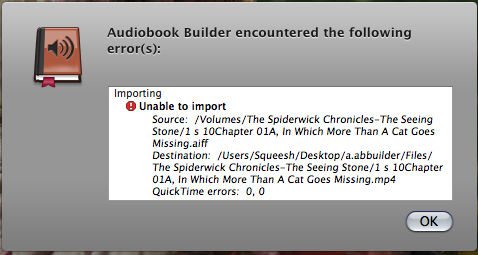
Picture 3.png
Picture 3.png [ 47.57 KiB | Viewed 12606 times ]


Attachment:
File comment: Error after build
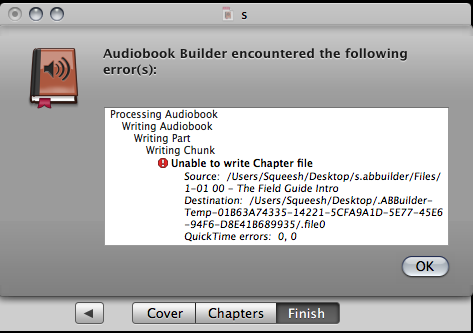
Picture 2.png
Picture 2.png [ 49.45 KiB | Viewed 12606 times ]


Here's what I am doing.

Insert cd.
iTunes opens and get cd info.
Quit iTunes.
Launch ABB.
Enter info (tried) with or without cover art.
Chapter. Click import cd. Individual files. (should I choose single file to get proper chapters?)
I get error message. Unable to import. Source... Destination... Quicktime errors: 0,0

When I have files ripped by iTunes as m4a.
Enter info.
Add files.
Files import.
Goto finish.
Click Build Audiobook.
Get error message. Unable to write chapter file. Source... Destination... Quicktime errors: 0,0

Now I tried various settings, save locations, files from desktop to desktop. Nothing works.

2.4Ghz 20 inch iMac
OSX 10.5.5
Quicktime 7.5.5

Any help would be appreciated,

Chris


Top
 Profile  
Reply with quote  
PostPosted: Tue Oct 28, 2008 9:09 am 
Offline

Joined: Sat Oct 25, 2008 6:46 pm
Posts: 3
Had a bit of an idea so I created a fresh user profile and tried again. Same results. I will try an old G4 I have lying around and see what happens.... will update...

BTW... haven't posted it yet but I can't get ViddyUp! to work either. Also get quicktime errors. Will post to that forum later.

Chris


Top
 Profile  
Reply with quote  
PostPosted: Tue Oct 28, 2008 2:10 pm 
Offline
Administrator
Administrator
User avatar

Joined: Wed May 18, 2005 11:19 pm
Posts: 597
Location: Here and There
My first guess is an issue with QuickTime is preventing it from converting to MPEG-4 audio. Could be a third-party component conflict (you can temporarily move all the items in /Library/QuickTime/ and re-launch Audiobook Builder or ViddyUp! to test) or something within QuickTime itself. If the third-party idea doesn't check out the next step would be to install the latest version of QuickTime over what's already installed. Please let us know what happens from there. Thanks Chris!

_________________
Keith Gugliotto
Primordial Sea Captain
Splasm Software
https://www.splasm.com


Top
 Profile  
Reply with quote  
PostPosted: Wed Oct 29, 2008 8:38 am 
Offline

Joined: Sat Oct 25, 2008 6:46 pm
Posts: 3
Keithg,

That was it!!! Although I haven't tried ViddyUp! yet.

I removed all the codecs and put them back in groups.

Would you believe it turns out that it is the "QuickTimeMPEG4.component"?

This is the culprit.

Version: QuickTimeMPEG4.qtx 6.5.1

I'll have to look for an updated version or just pull the sucker when I want to run ABB or ViddyUp!

Thank you, I never even thought of it being a codec problem. Felt like OS7/8 days; having to track down an Extension conflict.

I'll let you know about ViddyUp!

Chris


Top
 Profile  
Reply with quote  
Display posts from previous:  Sort by  
Post new topic Reply to topic  [ 4 posts ] 

All times are UTC - 6 hours


Who is online

Users browsing this forum: No registered users and 1 guest


You cannot post new topics in this forum
You cannot reply to topics in this forum
You cannot edit your posts in this forum
You cannot delete your posts in this forum
You cannot post attachments in this forum

Search for:
Jump to:  
cron
Powered by phpBB® Forum Software © phpBB Group


Home | Products | Support | Forum | Store | Contact | News | Privacy
Copyright © 2002- Splasm Software, Inc.